Hidden Feature: Teach the AI How Your Cards Are Supposed to Behave
Published 2026-07-09
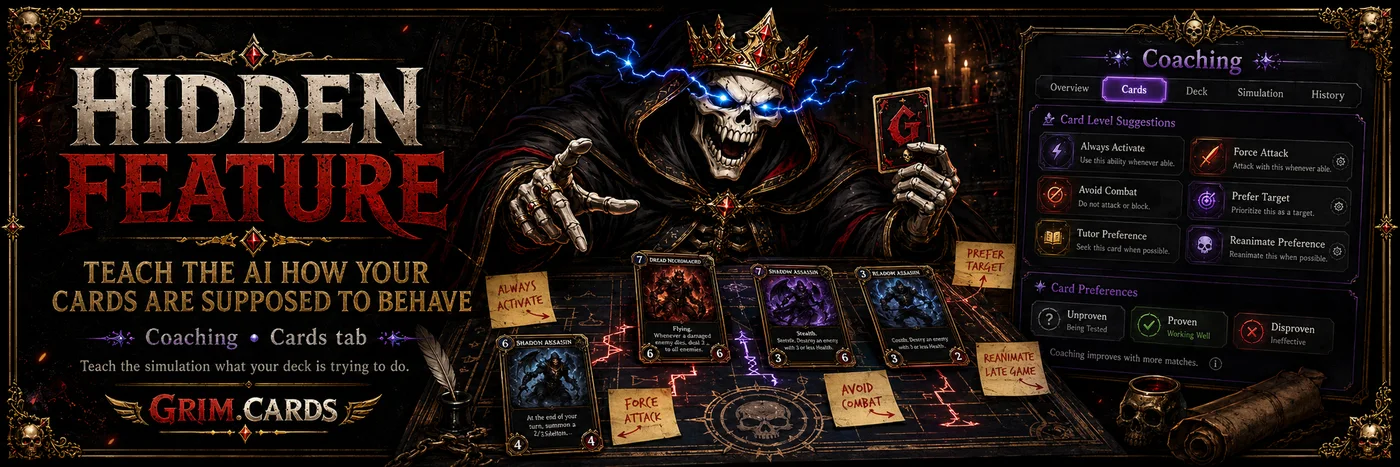
Most deck testers treat every card like the AI should just magically “get it.”
Cute.
But Magic is not just card text. It is context, timing, sacrifice fodder, tutor priorities, combat judgment, graveyard plans, and knowing that one weird creature in your deck is not supposed to heroically die in combat like an idiot.
That is why Grim.Cards has another feature hiding in plain sight:
You can give the AI card-level coaching.
Not vague deck advice. Not “play better, skeleton.” Actual instructions for how specific cards in your deck should behave during simulations.
You’ll find it on the Coaching page under the Cards tab.
That is where Grim.Cards starts letting you whisper into the machine’s ear.
Some Cards Need Special Instructions
A lot of cards are simple.
Big creature attacks.
Removal kills thing.
Ramp makes mana.
Goblin does something regrettable.
But some cards need a little more guidance.
Maybe a creature should attack whenever it is reasonably safe.
Maybe an engine piece should stay out of combat entirely.
Maybe an activated ability should fire whenever it can.
Maybe a sacrifice effect should feed on tokens instead of accidentally eating the card your whole deck is built around.
Maybe your tutor should go find the actual win condition instead of wandering into the library and coming back with a shovel.
That is where Card Level Suggestions come in.
Card Level Suggestions: Tiny Coaching Notes for Individual Cards
Card Level Suggestions, or CLS, are per-card rules that tell the AI how to treat a specific card in your deck.
You can nudge a card to:
Always Activate an ability when it is available, with optional limits like main phase only, only if it nets mana, or only a certain number of times per game.
Force Attack when a creature can swing without making a suicide run into the wood chipper.
Avoid Attack, Avoid Block, or Avoid Combat when a card is too important to throw into the red zone.
Only Combat Smaller so a creature only attacks or blocks when it survives the exchange.
Prefer Permanent Target so targeting effects aim at what actually matters, like your commander, the enemy commander, a named card, or a category of permanent.
Prefer Target: Self or Opponent for effects that target players.
This is the difference between “the AI played my deck” and “the AI had at least one sticky note explaining the cursed little engine I built.”
The Best Part: Grim.Cards Tests the Advice
Here is where it gets interesting.
Grim.Cards does not just blindly assume every suggestion is correct.
Every new card-level suggestion starts as unproven.
During simulations, Grim.Cards counterfactually tests whether that rule actually helps. While a rule is on trial, it is capped at minimal fires per game. If the suggestion consistently improves outcomes, it can graduate to proven status and fire more often, eventually becoming the default behavior.
If it hurts the deck, Grim.Cards can mark it disproven.
Which is a very polite way of saying:
“Your brilliant idea has been dragged into the Gauntlet and found wanting.”
And yes, if you are absolutely sure you know better, you can force a rule to always apply.
Sometimes the machine is wrong.
Sometimes you are.
The graveyard accepts both.
Card Preferences: Tell the AI What Matters Most
Card Level Suggestions help with how individual cards behave.
Card Preferences help with what certain mechanics should choose.
These are ordered preference lists for the decisions that can quietly decide games:
Sacrifice preference tells the AI what to feed to sacrifice effects first.
Discard preference controls what gets pitched when something has to go.
Tutor preference tells search effects what to find first.
Reanimate preference ranks what should come back from the graveyard.
That last one matters. A lot.
Because if your deck is built around reanimating one horrifying problem creature, and the AI keeps bringing back a random value dork with the emotional impact of a damp napkin, that is not a deck failure.
That is a communication failure.
Now you can communicate.
It Can Even Change by Opponent
Some choices should not be universal.
Maybe against one matchup, you need to tutor for removal.
Against another, you need protection.
Against another, you need to reanimate the biggest monster available and ask questions never.
Grim.Cards lets card preferences be opponent-specific, so your deck can behave differently depending on what is trying to kill it.
That matters because the Gauntlet is not one enemy.
It is a lineup of problems.
And some problems deserve different sacrifices.
Grim.Cards Finds the Relevant Cards for You
You do not have to manually inspect every card in your deck like a rules lawyer trapped in a basement.
Grim.Cards auto-classifies roughly 33,000 cards by oracle text, so it can detect which cards in your deck sacrifice, discard, tutor, or reanimate.
Then it offers the preference builder where it is actually relevant.
That means the feature is powerful without asking you to become a spreadsheet goblin.
You go to the Coaching page.
Click the Cards tab.
Find the cards where behavior matters.
Add suggestions or preferences.
Then send the deck back into the Gauntlet and see whether your coaching made the deck sharper — or just gave it a more elaborate way to die.
Why This Matters
Sometimes your deck does not need a new card.
Sometimes it needs the AI to understand that this creature is not expendable.
Sometimes it needs to know which card to sacrifice.
Sometimes it needs to stop attacking with the engine piece.
Sometimes it needs to tutor like it has a plan.
Sometimes it needs to reanimate the thing that actually ends games.
That is what the Cards tab is for.
It lets you move beyond “test my deck” and into something much more dangerous:
Teach the simulation what your deck is trying to do.
The Reaper will still judge it.
But at least now, your deck gets to die according to instructions.
Go to the Coaching page, open the Cards tab, and start teaching your deck how to behave.
Test your MTG deck for free at Grim.Cards.